
Resources

Salesforce Commerce Cloud

In today’s competitive digital marketplace, selecting the right eCommerce platform is no longer just a technical decision. It directly impacts customer experience, operational efficiency, and long-term growth. Among the many solutions available, Salesforce Commerce Cloud (SFCC) stands out as an enterprise-level platform trusted by leading global brands.

But is it the right choice for your brand? Let’s dive deep into what Salesforce Commerce Cloud offers, its benefits and challenges, how it compares with alternatives, and the type of businesses that gain the most value from it.

What Is Salesforce Commerce Cloud?

Salesforce Commerce Cloud is a cloud-based, enterprise-grade eCommerce solution that helps brands unify customer experiences across web, mobile, social, and physical stores. Unlike smaller platforms, it goes beyond just running an online shop. It enables personalized engagement, omnichannel sales, and AI-driven insights.

Core Features of Salesforce Commerce Cloud:

  • Omnichannel capabilities: Connect physical and digital sales for a unified experience.
  • Personalized experiences: Leverage Salesforce Einstein AI for smart recommendations.
  • Global commerce support: Multi-language, multi-currency, and region-specific tax compliance.
  • Scalability: Handle peak traffic like seasonal sales without downtime.
  • Native integration: Works seamlessly with Salesforce Marketing Cloud, Service Cloud, and CRM.
  • Mobile-first design: Optimized for today’s mobile shoppers.

For many enterprises, partnering with a Salesforce development company is key to unlocking the full potential of this platform, ensuring smooth implementation, customization, and ongoing optimization.

Why Do Brands Choose Salesforce Commerce Cloud?

Here are the top reasons businesses adopt SFCC:
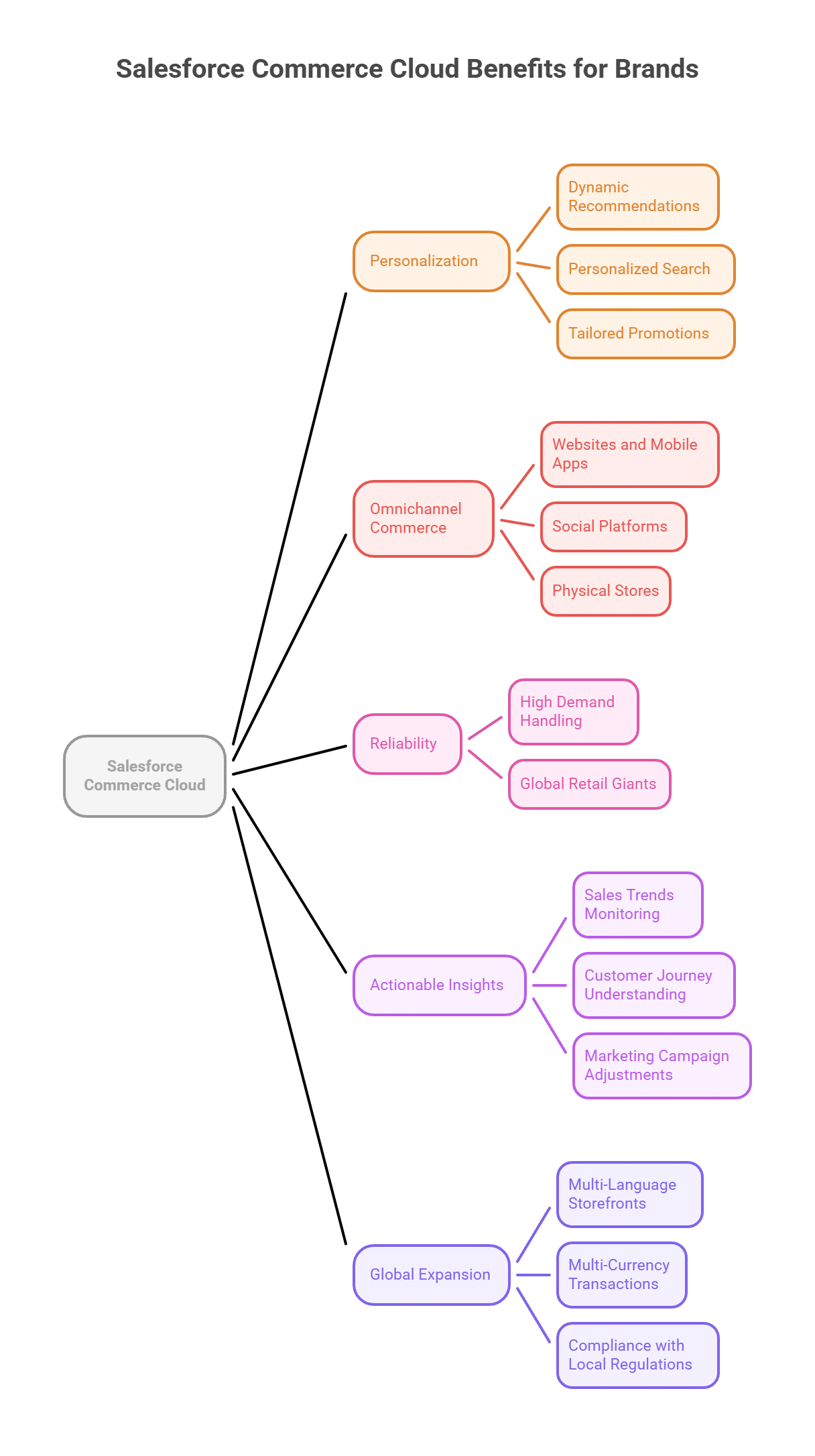
Salesforce Commerce Cloud Development

1. Personalization That Drives Conversions

Customers no longer want generic shopping experiences. They expect brands to anticipate their needs. Salesforce Einstein, the AI backbone of SFCC, powers features like:

  • Dynamic product recommendations.
  • Personalized search results.
  • Tailored promotions.

Studies show personalization can improve conversion rates by 20–30 percent and significantly boost repeat purchases.

2. Omnichannel Commerce for Today’s Buyers

Modern consumers switch between devices and channels effortlessly. Salesforce Commerce Cloud helps businesses deliver consistent experiences across:

  • Websites and mobile apps.
  • Social platforms like Instagram and Facebook.
  • Physical stores, enabling buy-online-pickup-in-store (BOPIS) or curbside pickup.

This omnichannel approach increases customer satisfaction and retention.

3. Reliability During High Demand

Seasonal promotions, flash sales, or viral campaigns can cause unexpected traffic surges. Salesforce Commerce Cloud is designed for scale, processing millions of transactions daily without affecting performance. This reliability makes it a preferred choice for global retail giants.

4. Actionable Insights From Data

With built-in reporting and advanced analytics, SFCC empowers businesses to:

  • Monitor sales trends in real time.
  • Understand customer journeys.
  • Adjust marketing campaigns quickly.

When combined with Salesforce CRM, businesses gain a complete 360-degree view of their customers.

5. Global Expansion Made Easy

For brands looking to grow internationally, Salesforce Commerce Cloud offers:

  • Multi-language storefronts.
  • Multi-currency transactions.
  • Compliance with local tax rules and regulations.

This allows businesses to scale globally without re-building systems from scratch.


custom software development company in usa

Challenges and Drawbacks of Salesforce Commerce Cloud

While Salesforce Commerce Cloud offers unmatched enterprise capabilities, it may not be suitable for every business.

1. High Cost

The revenue-share model means Salesforce charges a percentage of your Gross Merchandise Value (GMV). For smaller businesses, this can feel expensive compared to subscription-based platforms.

2. Complexity

SFCC is designed for enterprises, which makes it feature-rich but also complex. Businesses often need certified developers or consultants for setup and management.

3. Customization Boundaries

Although highly extensible, SFCC has certain limitations compared to open-source platforms like Magento or WooCommerce.

Smaller businesses, especially those focused on budget-friendly solutions, might prefer to hire WooCommerce developers who can provide more cost-effective and flexible store-building options.

Salesforce Commerce Cloud vs. Competitors

How does SFCC compare to other popular eCommerce platforms?

Feature

Salesforce Commerce Cloud Shopify Plus

Magento (Adobe Commerce)

Best For Mid-to-large enterprises Fast-scaling D2C brands Highly customizable stores
Pricing Model Revenue share (GMV-based) Subscription + fees Licensing + hosting costs
AI & Personalization Built-in with Einstein Add-ons required Extensions required
Global Capabilities Enterprise-ready Moderate Strong but manual setup
Integration Deep Salesforce ecosystem Large app marketplace Custom APIs available
Ease of Use Steep learning curve Beginner-friendly Requires developers

Key takeaway: Salesforce Commerce Cloud is ideal for enterprises aiming for global scale and deep personalization. Shopify Plus suits fast-growing direct-to-consumer brands, while Magento is best for businesses seeking ultimate flexibility and customization.

Industry Insights and Market Data

  • Global eCommerce sales are projected to surpass 8.1 trillion USD by 2026. Platforms like SFCC enable brands to capture a larger slice of this growth.
  • 91 percent of retailers with omnichannel strategies achieve higher year-over-year customer retention compared to those without.
  • Brands using AI-driven personalization report up to 30 percent increases in sales and engagement.

These insights show why global leaders in retail, fashion, and consumer goods continue to invest heavily in Salesforce Commerce Cloud.

Is Salesforce Commerce Cloud Right for Your Brand?

Ask yourself the following:

  • Do you process high transaction volumes regularly?
  • Do you need to unify in-store, mobile, and online experiences?
  • Is personalization a top priority for your growth strategy?
  • Do you already use other Salesforce solutions like Marketing Cloud or CRM?

If most answers are yes, Salesforce Commerce Cloud is likely the right platform.

However, if cost or technical complexity are concerns, consider alternatives such as Shopify Plus or WooCommerce. And if your needs extend beyond eCommerce into broader enterprise technology, partnering with a custom software development company in USA can help integrate SFCC into your overall digital strategy.

Final Thoughts

Salesforce Commerce Cloud is far more than an eCommerce platform. It is a customer experience powerhouse that blends AI personalization, omnichannel commerce, global scalability, and seamless integration into one robust system.

Yes, it comes with higher costs and complexity, but for enterprises looking to scale globally, enhance customer engagement, and future-proof their digital presence, the investment pays off.

Bottom line: If your brand is aiming for enterprise-level transformation and wants to deliver world-class digital shopping journeys, Salesforce Commerce Cloud is not just a good option, it may be the perfect choice.

FAQs

1. What type of businesses benefit most from Salesforce Commerce Cloud?

Mid-to-large enterprises, especially in retail, fashion, consumer goods, and global brands, see the greatest benefits.

2. Is SFCC affordable for small businesses?

Not always. Smaller companies may find platforms like Shopify or WooCommerce more cost-effective.

3. Does Salesforce Commerce Cloud support international selling?

Yes. It supports multiple currencies, languages, and tax systems for international markets.

4. How does it improve customer experience?

Through AI personalization, seamless omnichannel shopping, and unified data insights, customers receive tailored, consistent experiences.

5. Can Salesforce Commerce Cloud integrate with other tools?

Absolutely. Its strongest advantage is deep integration with Salesforce’s ecosystem, including CRM and Marketing Cloud.


Troubleshoot Lovable AI App Builder

Lovable AI App Builder empowers anyone to create full-stack web apps using simple English prompts, no coding required. As a leading tool for those seeking ai software development services, it integrates with tools like Supabase for databases and GitHub for version control, making it ideal for entrepreneurs and non-technical creators. But bugs, like UI glitches or backend errors, can stall your project. This guide answers common questions about fixing Lovable AI issues, with step-by-step solutions to save your app. Over 500,000 apps have been built on Lovable as of September 2025, with an 87% user retention rate, but 40-50% of users face issues like misaligned layouts or data failures. Here’s how to resolve them quickly.

What Are the Most Common Lovable AI App Builder Problems?

Users often encounter these five issues:

  1. UI or layout glitches (e.g., misaligned buttons or broken designs).
  2. Backend errors, like data not saving to Supabase.
  3. AI misinterpreting prompts, creating wrong features.
  4. AI unresponsiveness or repetitive outputs.
  5. Platform integration issues, like GitHub sync failures.


Below, we address each problem with clear fixes, backed by practical tips and stats to help you succeed.

How to Fix UI or Layout Glitches in Lovable AI

Problem: About 30% of Lovable users face frontend issues, like buttons disappearing or layouts shifting, often due to CSS conflicts or vague prompts. This can frustrate those relying on Lovable as a website development company to create polished, user-friendly designs.

Layout Glitches in Lovable AI

Solutions:

  • Use “Try to Fix”: Click the “Try to Fix” button in the editor to scan logs and patch issues like misaligned elements. This resolves 60% of simple glitches instantly.
  • Adjust Manually: In the visual editor, select the faulty component and reposition it via drag-and-drop. Set global styles (e.g., Inter font, #007BFF blue, 1rem margins) for consistency across pages.
  • Add Screenshots: Upload a screenshot in Chat Mode and prompt:Fix the navbar overlapping the hero section for mobile responsiveness.” Visuals boost AI accuracy.
  • Use Prebuilt Components: Replace broken elements, like forms, with Lovable’s library components. Test in preview mode for seamless integration.

Tip: Build layouts before logic to cut UI errors by 50%, preventing cascading issues.

How to Resolve API or Backend Issues in Lovable AI

Problem: Around 25% of projects hit backend snags, like data not saving or authentication loops, especially with Supabase integrations.

Solutions:

  • Check Credentials: For errors like 403 Forbidden, verify Supabase keys in integration settings. Test endpoints with Lovable’s built-in tester. Keep API calls under 100 per minute for free tiers.
  • Visualize Logic: Prompt in Chat Mode: “Why isn’t user data saving to Supabase? Suggest a fix.” Use visual tools to tweak logic flows without coding.
  • Fix Sync Delays: For delayed updates, set JavaScript hooks to re-sync every 5 seconds. For multi-user apps, prompt:Enable real-time syncing for the user list table.
  • Revert and Rebuild: Roll back to a stable version via Git integration, then add features step-by-step (e.g., auth, then data). Console logs catch 70% of errors early.

Insight: Mismatched schemas cause 40% of backend issues. Prompt: “Generate a Supabase schema for users with email, role, and timestamp fields.”

Issue

Diagnostic

Fix Time

Data Mismatch

Check schema

10-15 mins

API Error (404)

Verify URL

5 mins

Sync Failure

Add real-time hooks

20 mins

How to Handle AI Prompt Misinterpretations in Lovable

Problem: The AI misinterprets 35% of user prompts, building unwanted features or missing key details, which can derail projects for those using Lovable as a custom app development company.

Solutions:

  • Write Clear Prompts: Use this format:
    1. Overview: “Build a CRM app.”
    2. Pages: List components (e.g., login, dashboard).
    3. Flow: “User logs in, sees dashboard.”
    4. Visuals: Attach wireframes.
    5. Steps: “First, auth; then, data fetch.”


  • Refine in Chat Mode: Ask: “Summarize the project and fix the login issue.” Then clarify: “Use Google OAuth only.” This fixes 75% of misinterpretations.
  • Be Specific: Avoid vague terms like “nice.” Instead, prompt: “Add a blue button, white text, 16px font.” If issues persist, ask: “What else can fix the search bar?”

Insight: Clear prompts reduce errors by 65%, making apps faster to build.

What to Do When Lovable AI Is Unresponsive

Problem: AI freezing or repeating answers frustrates users, often due to usage limits or overload.

Solutions:

  • Refresh Session: Clear browser cache and use “Try to Fix” or restart. Check plan limits, as free tiers cap usage.
  • Test Agent Logic: Define agent roles (e.g., “Supabase query agent”) and test in real-time. Rebuild faulty agents in the AI Agent Builder.
  • Prompt for Logs: In Chat Mode, ask: “Why is the AI unresponsive? Check logs.” Contact support if unresolved (paid users get priority).

How to Fix Platform or Integration Errors in Lovable

Problem: File imports or GitHub syncs fail for 20% of users scaling projects.

Solutions:

  • Check Files: Ensure files are under 10MB and in formats like PNG or CSV. Prompt:Import this CSV and fix parsing errors.
  • Fix Git Sync: Verify repo tokens. Roll back via “Version History” if sync fails. Use logs to spot conflicts.
  • Update Lovable: Recent updates fixed 80% of integration bugs, so stay on the latest version.

Best Practices to Prevent Lovable AI Issues

  • Build Incrementally: Start with structure, test often, and use community templates (thousands available).
  • Track Prompts: Save prompts and fixes in a document for quick reference.
  • Engage Community: Join Lovable forums to share screenshots and get fast peer advice.
  • Use Support: For persistent issues, contact support or explore visual backend tools, but prioritize Lovable’s features.

Why Choose Lovable AI Despite Bugs?

With millions of users and a thriving community, Lovable simplifies app-building for all skill levels. Bugs are common, but 80% of issues can be fixed quickly with these tips. Persistent problems? Lovable’s support and forums are there to help. Keep prompting, stay patient, and turn your idea into a working app.

Digital Assets Profits

Imagine owning a piece of digital art that’s not just a pretty picture on your screen but a verifiable asset worth millions, or earning real money by playing a video game in a virtual world. Sounds like science fiction? Welcome to the era of digital assets, where pixels are turning into profits and redefining what we consider valuable. In a world increasingly lived online, digital assets like cryptocurrencies, NFTs, and tokenized real-world items are disrupting traditional notions of ownership, investment, and economy. This comprehensive guide explores how these innovations are reshaping value, backed by the latest stats and insights as of September 2025. Whether you’re a beginner wondering how to start with digital assets or an experienced investor seeking market trends, we’ll cover everything you need to know to make informed decisions.

Understanding Digital Assets: What They Are and Why They Matter

Digital assets mark a new era in finance and property ownership. At their core, they are intangible items secured on blockchain technology, a decentralized ledger that guarantees security, transparency, and permanence. Unlike traditional assets such as stocks or real estate, digital assets exist in the virtual space but hold tangible real-world value. Businesses looking to leverage this technology can benefit from blockchain development services to create secure, custom solutions for managing these assets.

Key types of digital assets include:

  • Cryptocurrencies: Digital currencies like Bitcoin (BTC) and Ethereum (ETH) used for transactions, investments, or powering blockchain networks. They form the backbone of the digital economy.
  • Non-Fungible Tokens (NFTs): One-of-a-kind digital items, such as art, music, or virtual property. Blockchain verifies their uniqueness, enabling creators to monetize their work effectively.
  • Decentralized Finance (DeFi) Assets: Tokens facilitating lending, borrowing, and yield farming without traditional banks, offering peer-to-peer financial services.
  • Tokenized Real-World Assets (RWAs): Digital representations of physical assets like real estate shares or art pieces, democratizing access to high-value investments.

What makes digital assets revolutionary? They’re programmable, easily transferable, and can generate passive income via staking or automated royalties. For example, NFT creators can receive a percentage of every resale, ensuring long-term earnings.

The Rise of Digital Assets: Historical Evolution and Current Market Trends

Digital Assets and Current Market Trend

The story of digital assets began in 2009 with Bitcoin’s creation as a decentralized alternative to traditional money amid the global financial crisis. By 2015, Ethereum introduced smart contracts, paving the way for NFTs and DeFi. The 2021 boom propelled market caps to new heights, followed by a 2022-2023 downturn, but 2025 marks a strong rebound driven by institutional interest and regulatory clarity.

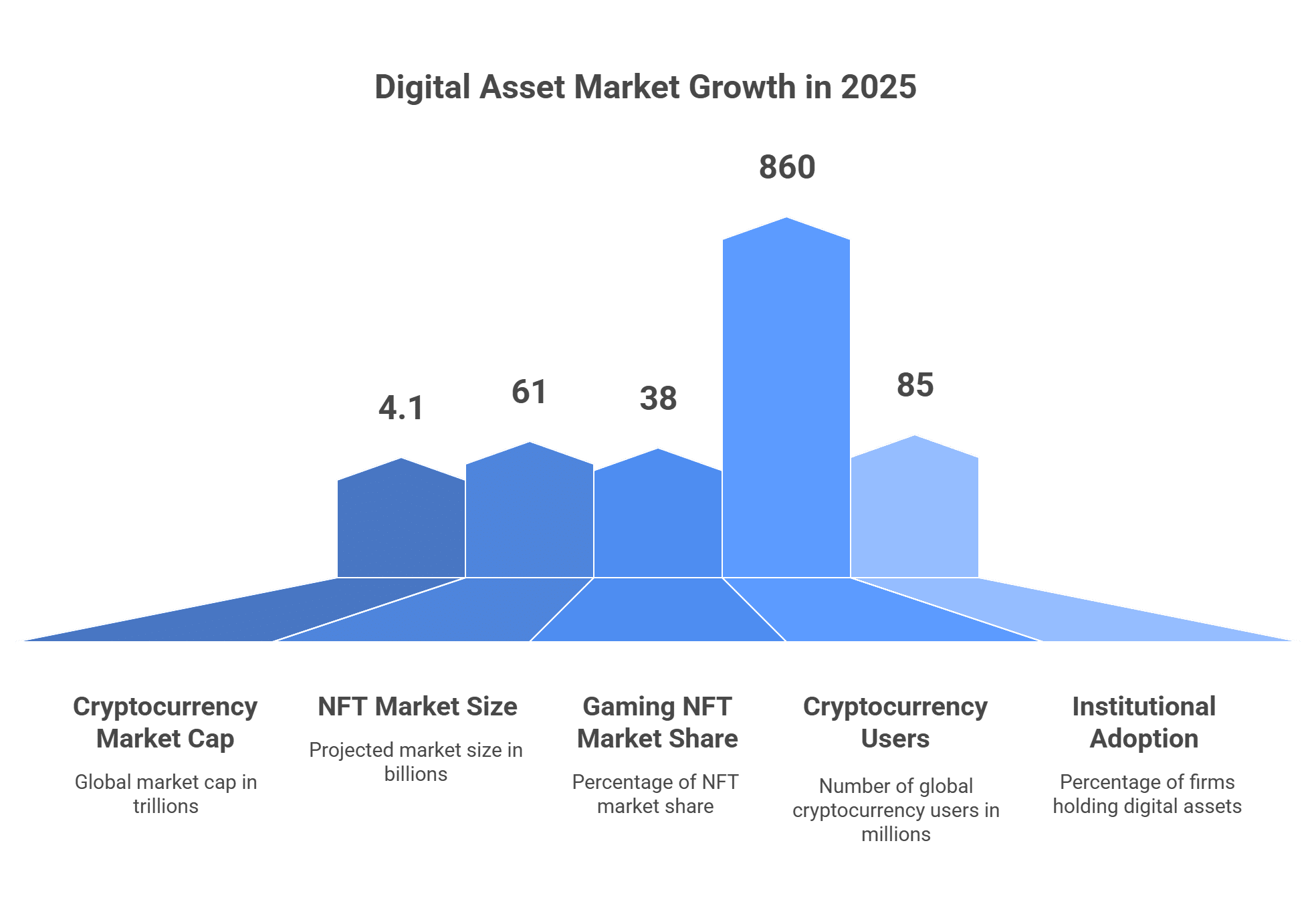
As of September 2025, the global cryptocurrency market capitalization hovers around $4.1 trillion, reflecting a 92% year-over-year growth fueled by renewed confidence and broader adoption. The NFT market is projected to reach approximately $61 billion in 2025, with a compound annual growth rate of around 30-40%, primarily driven by gaming (38% market share) and digital collectibles.

Insight on Adoption Trends: Worldwide, over 860 million people now own cryptocurrencies, up significantly from previous years. India and the United States lead the global crypto adoption index, with emerging markets like Pakistan, Vietnam, and Brazil close behind. This surge highlights digital assets’ role in financial inclusion, especially in regions with unstable currencies.

Institutions are diving in: About 85% of firms either hold digital assets or plan to allocate in 2025, with many expecting to increase their holdings. Blockchain’s efficiency in cutting intermediaries can reduce transaction costs by up to 80%, making it attractive for businesses.

Ways Digital Assets Are Transforming Value Creation

Digital assets are shifting value from centralized systems to accessible, user-controlled models. Here’s a breakdown of their impact:

1. True Ownership and Digital Scarcity

Value in the physical world stems from scarcity and usefulness. Digital assets replicate this through blockchain, preventing unlimited duplication. A famous NFT artwork sold for $69 million in 2021, demonstrating how digital items can fetch premium prices. In 2025, virtual land in metaverses like Decentraland commands millions, with one parcel selling for $2.4 million last year. This “digital scarcity” allows instant, global transfers with verifiable ownership. To engage users with these virtual worlds, businesses often hire mobile application developer teams to build intuitive apps for seamless access to NFT marketplaces and metaverse platforms.

2. Innovative Economic Models Powered by Digital Assets

  • Play-to-Earn Gaming: Platforms like Axie Infinity enable players to earn real-value NFTs and tokens. At its height, some users in developing countries out-earned traditional jobs, promoting economic empowerment.
  • Creator-Focused Economies: Marketplaces such as OpenSea let artists sell NFTs directly, skipping middlemen. Built-in royalties mean creators earn 10% or more on every resale.
  • Asset Tokenization: Everyday investors can now own fractions of luxury items like fine wine or property. Tokenized funds launched in 2024 manage billions, opening doors to previously exclusive markets.

Case Study: Bitcoin as Digital Gold: With a market cap exceeding $2.3 trillion in September 2025, Bitcoin has delivered over 10,000,000% returns for early 2010 buyers at $0.08 per coin, illustrating the profit potential of digital assets.

3. Accessibility and Financial Inclusivity

Anyone with a smartphone can participate. The UAE leads with high adoption rates, while DeFi offers annual yields of 10-20%, outpacing bank savings. This empowers the 1.7 billion unbanked globally to access finance.

Data Highlight: Daily crypto trading volumes surpass $100 billion, providing liquidity comparable to major stock exchanges.


Digital Asset Market

Navigating Challenges: Risks in the Digital Assets Space

Despite their promise, digital assets come with risks. Price volatility can cause 10-20% daily swings. Regulatory landscapes are evolving; 2025 has seen U.S. SEC and CFTC initiatives for clearer frameworks, but fines for unregistered tokens reach billions. Hacks, like the 2022 $600 million incident, and mining’s environmental impact remain concerns.

Additional hurdles include secure storage (custody) and classifying assets legally, such as whether NFTs count as securities. However, industry maturation and collaborations are addressing these, with expected regulations boosting trust and adoption.

Pro Tips for Safe Investing:

  • Choose trusted exchanges like Coinbase or Binance.
  • Enable multi-factor authentication.
  • Diversify your portfolio to spread risk.
  • Stay updated on regulations via official sources.

Future of Digital Assets: Projections and Emerging Trends

In 2025, trends show deeper mainstream integration. Institutional investments are rising, with firms expanding crypto services. Look for growth in RWAs, AI-enhanced trading, and Web3, where users control and monetize their data. Companies aiming to stay ahead are investing in AI software development services to integrate predictive analytics and automation into trading platforms, enhancing decision-making in the fast-paced digital asset market.

Market Projections: By 2030, the digital asset ecosystem could exceed $10 trillion, fueled by blockchain applications in supply chains and identity management. 24/7 trading and fractional ownership will enhance liquidity and inclusivity.

Expert Insight: With Bitcoin ETFs approved and stablecoins dominating flows, 2025 is a pivotal year for scaling adoption.

Conclusion: Embracing the Digital Assets Revolution

From Bitcoin’s origins to a $4.1 trillion market, digital assets are revolutionizing value by making finance accessible, innovative, and efficient. With NFTs projected at $61 billion and global users nearing a billion, opportunities abound, but approach with caution. For those starting out, educate yourself using tools like CoinMarketCap, invest gradually, and monitor regulations.

In this pixel-driven economy, informed action is key. What’s your next move in digital assets? Dive in wisely to potentially transform virtual holdings into substantial real-world gains.

Stuck in UI Bakery

Are you struggling with UI Bakery and hitting roadblocks that slow your progress? UI Bakery is a powerful low-code platform for building custom web apps like dashboards, internal tools, and customer portals. However, issues like performance lags, integration errors, or deployment challenges can frustrate even seasoned developers. This detailed guide provides expert solutions, step-by-step tips, and 2025 insights to accelerate your application development service and get you unstuck.

What Is UI Bakery and Why Use It?

UI Bakery enables developers to create and scale web applications with minimal coding, making it ideal for startups, enterprises, and solo developers. Its robust feature set includes:

  • Drag-and-Drop Interface: Over 75 responsive components (tables, forms, grids, buttons, lists, tabsets) for building UIs tailored for desktop and mobile, no CSS or JavaScript frameworks needed.
  • Data Source Connectivity: Integrates with 30+ sources, including 18+ SQL/NoSQL databases (e.g., PostgreSQL, MongoDB), REST/GraphQL APIs, and 17+ third-party services like Airtable or Stripe.
  • Flexible Logic Handling: Supports no-code CRUD operations (Create, Read, Update, Delete), data manipulation (looping, merging), custom JavaScript/Python code, SQL queries, and stateful automations for webhooks or scheduled tasks.
  • Versioning and Deployment: Git-based version control for team collaboration, release history tracking, version restoration, and one-click cloud or self-hosted deployments via Docker.
  • Enterprise-Grade Security: SOC 2 compliance, vulnerability protection, and granular user permissions for secure public or internal apps.


Why it’s a game-changer: Low-code platforms like UI Bakery cut development time by up to 90%, enabling launches in days instead of months. In 2025, the low-code market is valued at $12.86 billion and projected to reach $82.37 billion by 2034 with a 23% CAGR. By 2026, 75% of new enterprise apps will leverage low-code or no-code technologies, up from 25% in 2020, making it a must-have skill for modern developers.

Why Do I Get Stuck in UI Bakery?

Despite its strengths, UI Bakery’s focus on web apps and certain limitations can trip users up. Based on 2025 user feedback from forums and reviews, here are the top challenges:

  • Performance Bottlenecks: Apps lag due to constant re-rendering from hidden components, complex data flows, or inefficient queries, especially with large datasets.
  • Integration Errors: Mismatched API formats, OAuth authentication failures, or limited support for custom APIs. While native integrations are robust, non-standard setups need extra work.
  • Missing Components: No built-in calendars, timelines, or galleries, requiring workarounds. Free-tier users face limits on app deployments and advanced features like role-based permissions.
  • Learning Curve: Beginners struggle with chaining actions, managing state in automations, or deploying public apps. Documentation, while helpful, lacks depth for complex use cases.
  • Scaling and Cost: Free plans are restrictive for large apps, and pro/enterprise tiers can feel expensive for public deployments. Users report occasional bugs in webhooks or multi-environment setups.
  • Other Hiccups: SSO login errors (e.g., “Unknown error during login”), limited Python capabilities, and no native mobile support, which can be a drawback for those needing an ios application development service for cross-platform apps.


2025 Insight: 87% of enterprise developers rely on low-code platforms, yet 26% of executives note scaling challenges, highlighting the need for targeted solutions to these pain points.

How Can I Fix Performance Issues in UI Bakery?

Performance issues, reported by up to 30% of users, often stem from re-rendering loops or heavy data loads. Here’s a detailed fix guide:

Fix Performance Issues in UI Bakery

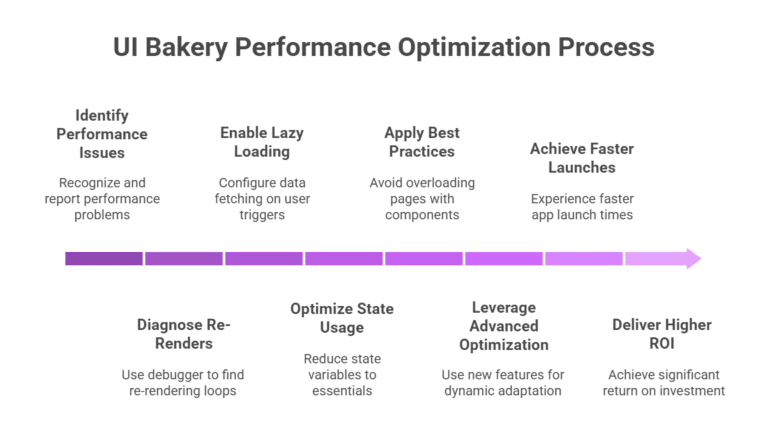
  • Diagnose Re-Renders: Use UI Bakery’s built-in debugger to pinpoint loops. If hidden components trigger updates, set visibility conditions (e.g., isVisible tied to a state variable) to render only when needed.
  • Enable Lazy Loading: For data-intensive components like tables or grids, configure actions to fetch data on user triggers (e.g., button clicks or pagination). Use paginated queries (e.g., LIMIT 10 OFFSET 0) to handle thousands of records without overloading.
  • Optimize State Usage: Reduce state variables to essentials, each variable can trigger UI updates. One user slashed load times by 50% by refining SQL queries and removing unused hidden elements.
  • Best Practices: Avoid overloading pages with 20+ components. Split complex apps into multi-page layouts to reduce initial load times. Monitor app logs for “constant re-rendering” warnings and adjust accordingly.
  • Advanced Optimization: Leverage 2025 updates like expandable containers to adapt dynamically to screen sizes, preventing layout-related slowdowns. For large datasets, use server-side filtering to minimize client-side processing.


Outcome: These steps align with low-code’s promise of 90% faster launches and can deliver up to 362% ROI by streamlining app performance.

How Do I Solve Integration Problems in UI Bakery?

Integration issues, such as API errors or database mismatches, are a top frustration. Follow this comprehensive troubleshooting guide:

  • Leverage Native Integrations: Connect supported databases like PostgreSQL or MySQL in minutes via the data source panel. Test with sample queries (e.g., SELECT * FROM users LIMIT 5) to confirm connectivity.
  • Handle Custom APIs: In the action builder, input API endpoints and test with mock JSON data. For authentication issues, verify OAuth tokens or API keys, common fixes include adding Bearer tokens in headers or resolving CORS errors by adjusting server settings.
  • Workarounds for Missing Features: Need a calendar? Combine a date picker component with a custom table for scheduling. For timelines or galleries, embed third-party widgets using iframes or inject custom HTML/CSS via JavaScript.
  • Debugging Tips: Check action logs for detailed error messages (e.g., “401 Unauthorized”). If JSON/XML formats mismatch, use JS transformations (e.g., JSON.parse(data)). For GraphQL, ensure queries match schema expectations.
  • Scaling Strategy: For complex integrations across global teams, consider offshore software development services to customize API connections, ensuring seamless data flow and compliance.


Pro Insight: UI Bakery’s AI app generator creates CRUD interfaces from databases in seconds, with users reporting multi-source dashboards built in hours.

How Do I Build and Deploy Apps Faster in UI Bakery?

To streamline logic, CRUD operations, and deployment, use these detailed strategies:

  • Create Efficient Forms and CRUD: Link tables to forms for seamless Create, Read, Update, Delete operations. Add input validation: Set required fields, use regex for emails (e.g., ^[a-zA-Z0-9._%+-]+@[a-zA-Z0-9.-]+\.[a-zA-Z]{2,}$), and display user-friendly error messages via action outputs.
  • Master Stateful Automations: Define variables for persistent data in webhooks or scheduled jobs (e.g., daily inventory updates). Use conditions (if/else logic) to chain actions, such as triggering emails after form submissions. Debug with action logs to trace errors like “undefined variable.
  • Streamline Deployment: Use Git-based version control to manage team changes and restore versions if errors occur. Set role-based permissions early to secure end-user mode. For public apps, upgrade to pro for custom domains, unlimited users, and live publishing.
  • Speed Hacks: Watch UI Bakery’s YouTube tutorials, like building a CRUD app with Baserow in under an hour. Mix no-code actions with JavaScript for complex logic, focusing on business rules over UI boilerplate. For self-hosted setups, deploy via Docker for compliance (e.g., GDPR, HIPAA).
  • 2025 Feature Boost: Stateful automations and enhanced action logs simplify complex workflows, reducing setup time for dynamic apps.


Stat: 41% of businesses use low-code to empower non-developers, cutting shadow IT and speeding up delivery.

Also Read: How to Do CRUD Operations in ReactJS Development Without API

Is UI Bakery Cost-Effective for Scaling Apps?

Scaling apps can raise cost concerns, but UI Bakery offers flexible options:

  • Free vs. Paid Plans: The free tier suits small projects but limits deployments and advanced features. Pro/enterprise plans unlock custom domains, unlimited users, and premium support. Exact pricing varies, so check UI Bakery’s website for details.
  • Self-Hosting for Savings: Use Docker for self-hosted deployments, ideal for compliance-heavy industries like healthcare or finance. This reduces cloud costs and ensures data control.
  • Community and Expert Support: Join the 2024-launched UI Bakery forum to share apps, get peer tips, or request features. For faster scaling, enterprise support or low-code consultants can resolve complex issues.
  • Pros and Cons: UI Bakery is cost-competitive for startups compared to tools like Retool, but public app scaling can be pricey. Users praise its flexibility but note occasional bugs in advanced features like webhooks.


Insight: In 2025, 65% of apps are built with no-code/low-code, and 26% of executives prioritize these platforms for scalable automation.

Why Should I Stick with UI Bakery?

UI Bakery remains a top choice in 2025’s low-code surge for compelling reasons:

  • Unmatched Speed: 72% of startups in 2024 used low-code with AI to launch apps rapidly, a trend growing in 2025.
  • Team Empowerment: 41% of businesses adopt low-code to reduce shadow IT and enable citizen developers, boosting productivity.
  • Real User Success: A small business owner built apps faster than traditional coding, praising UI Bakery’s feature set, affordability, and support. Engineering teams report 75% adoption in months, scaling to 80% company-wide in nine.
  • Market Momentum: The low-code sector is projected to hit $101.7 billion by 2030, with 75% of new apps leveraging low-code by 2026.


Mastering UI Bakery positions you ahead in a $86.9 billion market by 2027, making it a strategic skill for developers.

Final Tips to Succeed with UI Bakery

  • Explore Documentation: Dive into UI Bakery’s official guides for setup, automations, and deployment best practices.
  • Join the Community: Engage in the forum for real-time advice, app sharing, and feature requests.
  • Upgrade Strategically: Move to pro for unlimited scaling, custom domains, and advanced permissions.
  • Seek Help When Needed: If stuck, post your challenge below or consult experts to keep your project on track.
AI Slop

In today’s era of generative AI, social media feeds are increasingly saturated with uncanny images, strange videos, and repetitive posts. Much of this content is known as AI slop: low-value, mass-produced digital output created for clicks rather than quality.

But what exactly is AI slop, why is it spreading so quickly, and what risks does it pose for the online world?

What Is AI Slop?

AI slop describes the flood of mediocre or poorly crafted digital material produced by artificial intelligence, whether images, videos, audio, or text, pushed out in large quantities with minimal human creativity, editing, or oversight.

It often carries these traits:

  • Inaccurate or misleading
  • Uncanny visuals or phrasing that feel unnatural
  • Emotionally manipulative content designed to provoke quick reactions
  • Mass-produced output that prioritizes speed over depth

AI slop can be compared to digital junk food: cheap to produce, easy to consume, and lacking real value.

Examples of AI Slop:

  • Viral oddities like surreal AI-generated characters or images
  • Forum threads filled with fabricated personal stories designed to gain attention
  • Entire AI-generated music groups with fake backstories
  • YouTube or TikTok channels churning out repetitive, AI-created mashups
  • SEO blogs generated by content farms, stuffed with keywords but offering little substance

Why Is AI Slop Flooding Your Feed?

The spread of AI slop is driven by a combination of accessible technology, platform incentives, and profit-driven models. While the same tools can be used to support valuable work in fields like mobile application development, they are equally capable of producing endless streams of superficial content.

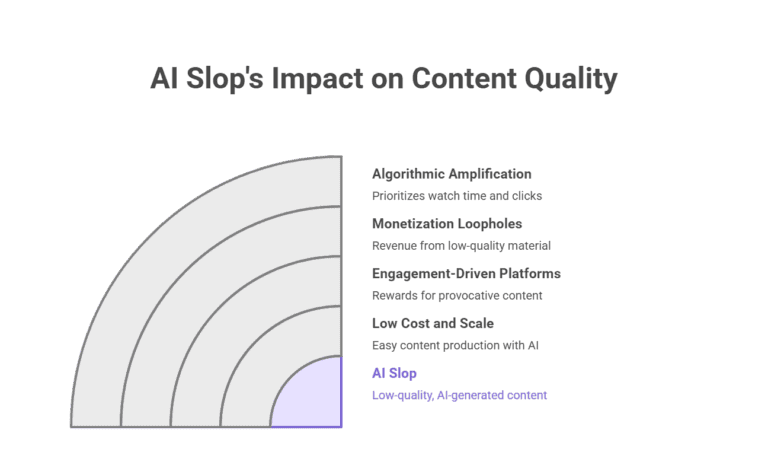
1. Low Cost and Scale

AI tools make it possible to produce content in seconds that once required teams of writers, designers, or videographers.

2. Engagement-Driven Platforms

Social platforms reward content that keeps users engaged. AI slop is designed to provoke reactions, which boosts its visibility.

3. Monetization Loopholes

Creators or bots can generate revenue from ads, affiliate links, or platform payouts by flooding feeds with low-quality material.

4. Algorithmic Amplification

Recommendation algorithms prioritize content that maximizes watch time and clicks. AI slop is optimized to fit these patterns.

5. Data Feedback Loops

The more AI slop circulates, the more it is included in future AI training data. This risks a decline in overall model quality over time, a problem known as model collapse.

The Data Behind AI Slop

  • A large percentage of social media users report difficulty distinguishing between AI-generated and human-made content.
  • Many publishing platforms are already struggling to handle a surge of AI-written material, particularly in self-publishing and blogging.
  • Social networks have seen rapid growth in accounts that rely primarily on AI to generate content at scale.
  • Even trusted resources such as online encyclopedias are facing challenges with AI-generated entries that undermine accuracy.


For independent professionals such as a web developer freelancer, this environment creates extra challenges. Original, human-driven work can be buried under repetitive AI-generated outputs, making visibility and trust even more critical.

Why It Matters

AI slop creates more than just digital noise. It also introduces serious challenges:

  • Reduces trust in journalism, platforms, and authentic media
  • Accelerates the spread of misinformation, especially during emergencies
  • Drowns out human creativity and thoughtful contributions
  • Overwhelms moderation systems that cannot keep up with the scale of AI content
  • Can be exploited for scams, phishing, or propaganda disguised as entertainment


Beyond individuals, an IT consulting company working with enterprises may also face risks when AI-generated misinformation impacts brand reputation, supply chain trust, or customer relationships.


Best content marketing expert in USA

How to Defend Against AI Slop

Users and creators alike can take steps to reduce its impact:

  • Verify content before sharing using reverse searches and fact-checking tools
  • Watch for signs of automation such as unrealistic visuals or repetitive language
  • Follow and support credible creators producing original work
  • Report AI-generated spam to help platforms filter it out
  • Learn to recognize the subtle markers of AI-generated content, from image anomalies to repetitive phrasing

Final Thoughts

AI slop is the result of rapid advances in generative technology combined with an internet economy that prioritizes speed and profit over quality. Left unchecked, it risks shaping a digital world dominated by volume instead of value.

The challenge is not artificial intelligence itself but the misuse of it for low-quality mass production. By choosing to support authentic, high-quality content and demanding better transparency, users and platforms can work together to ensure the internet remains a place for creativity, truth, and meaningful exchange.

Low-Code Mobile Development

Low-code mobile development is transforming how enterprises build mobile apps. This approach enables rapid, cost-effective solutions that meet customer and business needs. Explore why major companies are investing heavily in low-code platforms, with insights, stats, and examples to guide your decision.

What Is Low-Code Mobile Development?

Low-code mobile development uses visual interfaces, drag-and-drop tools, and pre-built templates to create apps with minimal coding. Unlike traditional methods requiring expertise in Swift or Kotlin for an ios application development service, low-code simplifies app creation for iOS and Android. Platforms like OutSystems and Mendix empower both developers and non-technical teams.

This hybrid approach balances speed and customization, ideal for enterprises managing complex workflows and tight deadlines. It streamlines app development while supporting custom code when needed.

Also Read: Stuck with AI App Builders Like Replit?

Top 5 Reasons Enterprises Choose Low-Code Mobile Development

Enterprises are adopting low-code platforms to address challenges like developer shortages and rising costs. Here’s why low-code mobile development is a game-changer.

1. Faster Time-to-Market

Low-code platforms cut app development time by 50 to 70 percent compared to traditional coding. Developers use reusable components and automated testing to launch apps in weeks, often starting with mvp software development to test ideas quickly. For example, a customer-facing inventory app can integrate APIs swiftly, keeping businesses competitive.

Visual showing drag-and-drop interface for low-code mobile app creation

2. Lower Development Costs

Hiring mobile developers costs over $150,000 annually in the US, excluding training. Low-code reduces expenses by up to 70 percent through efficient workflows and less debugging. Maintenance is also cheaper, as updates don’t require codebase overhauls.

3. Empowering Non-Technical Teams

Low-code enables “citizen development,” where non-technical staff like business analysts build apps using an application development service. This reduces IT backlogs and fosters innovation. For instance, a sales team can create a CRM app independently, with 84 percent of enterprises reporting broader development participation.

4. Scalable and Integrated Solutions

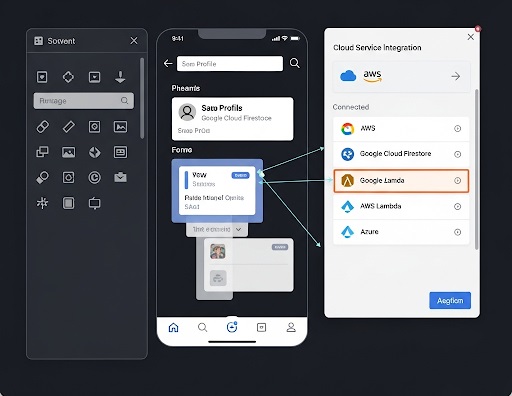
Low-code platforms support enterprise-grade security and cloud integration with AWS or Azure. They connect seamlessly with legacy systems and scale for features like IoT or AI. This ensures mobile apps align with broader digital strategies.

Screenshot of a low-code platform integrating with cloud services

5. Agility for Market Changes

Low-code enables quick updates for regulations or market shifts, reducing technical debt with modular designs. During disruptions, companies using low-code adapted faster to needs like remote work tools. This flexibility drives strategic advantages.

Also Read: How to Get Back on Track in Game Development with Rosebud AI

Key Stats on Low-Code Mobile Development

Data highlights the rise of low-code platforms for enterprise mobile apps:

Metric Insight Year
Market Size $26.3 billion in 2025, growing to $67.12 billion by 2030 at 20.61% CAGR 2025
Adoption Rate 70% of new enterprise apps will use low-code/no-code by 2025 2025
Enterprise Usage 98% of enterprises use low-code platforms or tools 2025
Developer Involvement 87% of enterprise developers use low-code 2024-2025
Future Growth Market to reach $187 billion by 2030 from $45.5 billion in 2025 2025-2030

By 2024, over 65 percent of app development relied on low-code or no-code platforms, addressing a global developer shortage of 4 million by 2025.

Success Stories: Low-Code in Action

Real-world examples show low-code’s impact on enterprise mobile development:

  • Bendigo Bank (Australia): Built mobile banking apps 60 percent faster, adding features like biometric logins for better engagement.
  • North Carolina State University: Created campus service apps, enabling non-IT staff to manage updates and cut costs.
  • Saga (Insurance Giant): Developed personalized mobile apps integrated with legacy systems, boosting user satisfaction.

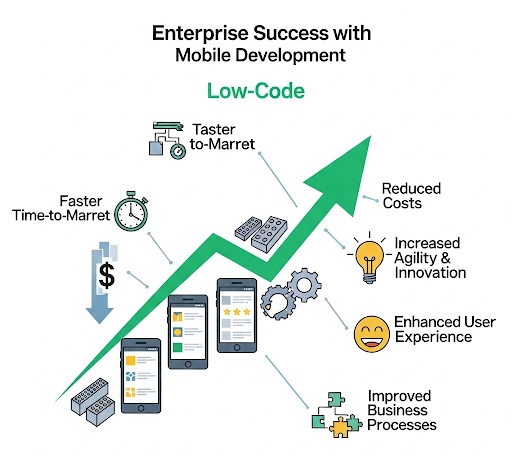
Infographic of enterprise success with low-code mobile development

Addressing Low-Code Challenges

Low-code may face issues like vendor lock-in or performance limitations for complex apps. Enterprise-grade platforms mitigate these with open standards and robust security. Start with a pilot project and choose platforms with strong support to minimize risks.

Is Low-Code Right for Your Enterprise?

Low-code mobile development offers speed, savings, and scalability for a mobile-first world. With markets growing and adoption soaring, it’s a strategic shift for enterprises facing app backlogs or innovation delays. Explore low-code platforms to transform your mobile strategy.

Game Development with Rosebud AI

Feeling stuck in your game development journey? Whether it’s uncooperative code, a creativity slump, or life’s challenges, getting derailed is common in game dev. This guide answers key questions about overcoming obstacles, leveraging Rosebud AI to streamline your workflow, and reigniting your passion. With practical steps, stats, and insights tailored for indie devs and hobbyists, you’ll learn how to bounce back and create games efficiently.

What Causes Game Developers to Lose Momentum?

Game development blends creativity, technical skill, and persistence, but several hurdles can stall progress. Understanding these helps you address them effectively:

  • Burnout and Crunch Culture: Long hours and tight deadlines cause exhaustion, anxiety, and reduced productivity. Indie devs, lacking studio support, often feel this most.
  • Scope Creep and Overambition: Simple ideas can balloon into unmanageable projects, leading to frustration and incomplete games.
  • Technical Roadblocks: Debugging, learning new tools, or creating assets from scratch can drain energy, especially for solo developers. Some may consider hiring a professional, such as when you hire Unity developer to tackle complex coding challenges.
  • Motivation Dips and Market Pressures: The saturated indie market, where luck drives much of the success, can make projects feel like long shots, sapping motivation.

What Causes Game Developers to Lose Momentum

Insight: Indie games hold strong with ratings close to AAA titles, showing that quality and innovation can shine if you push past setbacks.

How Can You Regain Your Game Dev Momentum?

Restarting your creative engine starts with mindset shifts and small wins. Here’s how to get unstuck:

  • Take a Break: Step away for 1-2 days. Play games, walk, or journal small wins to refresh your perspective.
  • Reconnect with Your Passion: Reflect on what excited you about your project. Set micro-goals, like coding one mechanic, to rebuild momentum.
  • Tap into Communities: Join r/gamedev or Discord groups to share struggles and gain advice. Connecting with others can spark inspiration, and some communities even connect you with an Offshore Software Development Company for collaborative support.


Data Point: Indie games account for nearly half of Steam’s sales revenue, proving there’s room for fresh ideas if you persist and iterate.

How Does Rosebud AI Help Game Developers Get Back on Track?

Rosebud AI is a no-code platform that simplifies game creation, making it ideal for indie devs looking to overcome barriers. Here’s how it supercharges your comeback:

  • Instant Idea Prototyping: Prompt Rosebud with “Build a retro platformer with jumping mechanics and enemy AI” to get a playable prototype in minutes, bypassing weeks of setup.
  • Effortless Asset Creation: Integrate with tools like Meshy to generate 3D models by describing them, eliminating the need for complex software.
  • Code Generation and Debugging: Rosebud produces clean, functional code for Unity or other engines, serving as a solid foundation for complex features, though minor tweaks may be needed.
  • Fast Publishing: Go from prompt to playable game quickly, perfect for indie devs aiming to test and release efficiently, including those targeting platforms supported by an iOS mobile app development company.


Pro Tip: Use Rosebud for rapid prototyping and add human polish for professional results. It’s especially strong for mobile games and creative, vibes-based projects.


Game Development Experts

What’s a Step-by-Step Plan to Restart Your Game Dev Project?

Follow this roadmap, powered by Rosebud AI, to regain momentum:

  1. Assess and Prioritize (1-2 Days): Identify blockers. Prompt Rosebud for “ways to simplify game scope for a solo dev” to find actionable solutions.
  2. Build a Prototype (3-5 Days): Use Rosebud to create a minimal viable game focusing on core loops. Starting small increases completion chances.
  3. Gather Feedback and Iterate (Ongoing): Share your prototype on platforms like itch.io. Use Rosebud’s AI to implement feedback, such as adding features via prompts.
  4. Prevent Burnout: Work in 90-minute sprints and track progress with tools like Trello to stay motivated.
  5. Launch and Learn: Release a beta. Success often comes from multiple tries, and Rosebud’s speed lets you experiment without heavy time investment.


Stat: Small-team indie games now drive a significant portion of industry revenue, showing tools like Rosebud level the playing field.

Why Should You Use Rosebud AI for Game Development?

Rosebud AI stands out for its accessibility and efficiency. It’s beginner-friendly, with tutorials like those on their YouTube channel, and supports both mobile and web games. By reducing technical barriers, it lets you focus on creativity and iteration, crucial for indie success. The platform’s ability to generate code, assets, and prototypes from simple prompts makes it a must-have for devs looking to save time and stay motivated.

Frequently Asked Questions

How do I overcome game dev burnout?

Take short breaks, set small goals, and connect with communities for support. Use tools like Rosebud AI to reduce workload and reignite creativity.

Can Rosebud AI help beginners in game development?

Yes, its no-code platform and intuitive prompts make it ideal for beginners, with tutorials guiding you through the process.

What types of games can I make with Rosebud AI?

You can create mobile and web games, from retro platformers to puzzle games, using simple text prompts to generate prototypes and assets.

How do I simplify a game project that’s too big?

Prompt Rosebud AI for scope-reduction ideas, focus on core mechanics, and prototype a minimal viable game to test concepts quickly.

Where can I find Rosebud AI resources?

Visit rosebud.ai for the platform and check their YouTube channel for getting-started tutorials.

Ready to Level Up Your Game Dev Journey?

Getting back on track is about progress, not perfection. In a competitive indie market, Rosebud AI is your secret weapon, streamlining creation and letting you focus on what you love. Whether crafting a cozy puzzle game or an action-packed adventure, start small, leverage AI, and keep iterating. If you find yourself stuck, YES IT Labs can help with expert development support to push your project forward. Visit rosebud.ai to kickstart your project with a single prompt. What game will you create today?

Azure OpenAI Reshapes Business

Created by Microsoft, Azure OpenAI skillfully merges OpenAI’s state-of-the-art AI technologies with the dependable Azure cloud framework. This dynamic system allows businesses to handle data with greater insight and optimize their processes, resulting in notable efficiency gains and improved output. By mid-2025, statistics show that approximately 68% of Fortune 500 firms have integrated Azure OpenAI to enhance various workflow elements, underscoring its broad influence. In this overview, we examine how Azure OpenAI is transforming business intelligence (BI) and automation, backed by practical examples, tangible benefits, and essential adoption strategies. With over 1,200 success narratives from Microsoft clients, it’s clear this technology is sparking creativity across multiple industries. Collaborating with a Microsoft Azure Development Company in USA can assist organizations in customizing these tools to fit their unique needs.

What Azure OpenAI Offers for Businesses

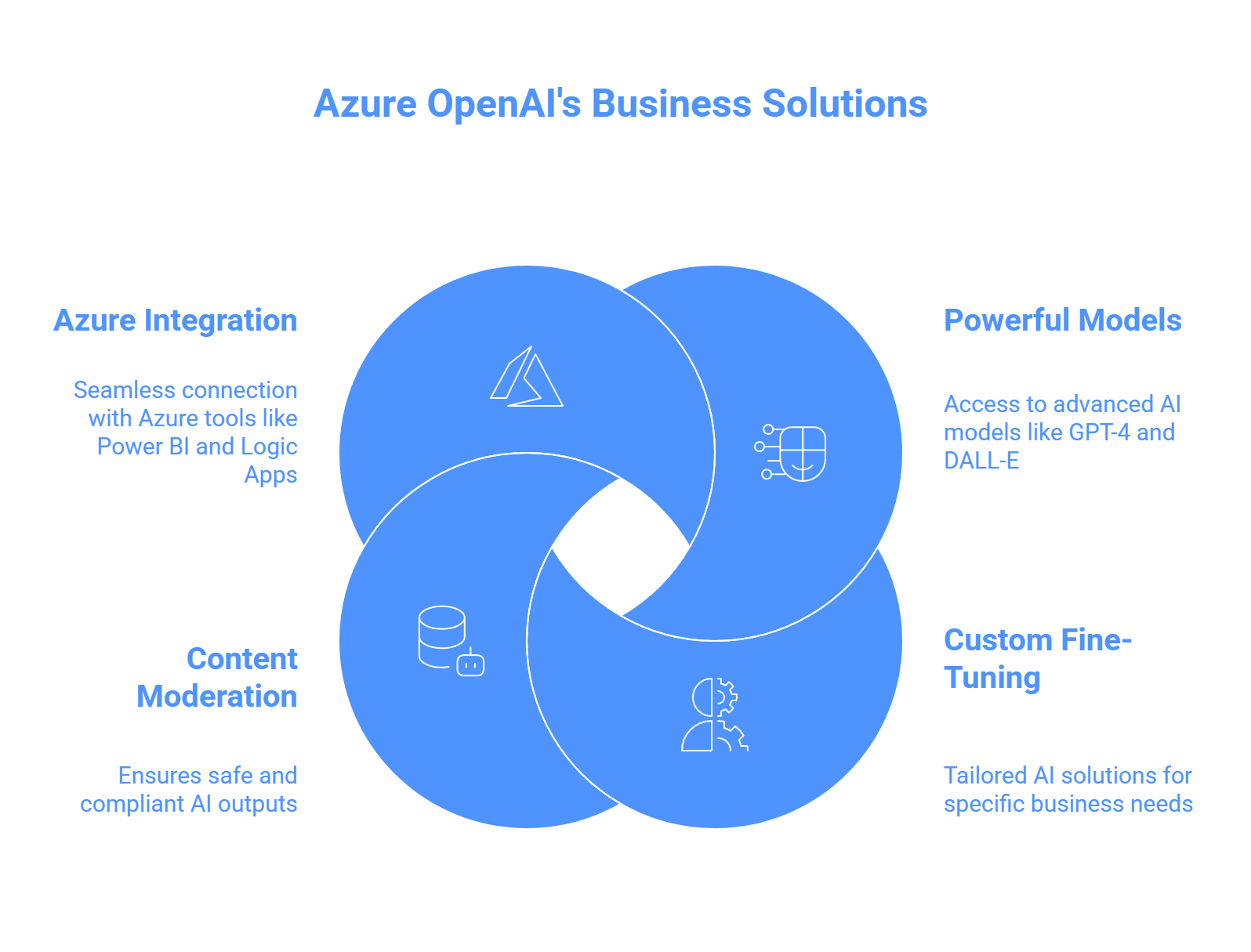
Azure OpenAI provides enterprise-grade AI tools optimized for security, scalability, and compliance. Key features include:

Azure OpenAI Offers for Businesses

  • Access to powerful models like GPT-4 and DALL-E.
  • Custom fine-tuning for tailored solutions.
  • Robust content moderation for safe outputs.
  • Seamless integration with Azure tools like Power BI and Logic Apps.


These capabilities make it ideal for transforming how businesses handle data and workflows.

How Azure OpenAI Enhances Business Intelligence

Business intelligence involves turning raw data into actionable insights. Azure OpenAI makes this faster and more intuitive.

Can You Query Data Easily with Azure OpenAI?

Yes, Azure OpenAI enables natural language querying. With tools like Power BI, users can ask questions like “What are our top products this year?” and get instant visualizations. This feature:

  • Empowers non-technical teams to access insights.
  • Automates report summaries and trend analysis.
  • Speeds up development with AI-generated code comments.


For example, companies use it to create narrative reports that highlight key trends and predictions from datasets. Businesses seeking custom interfaces to interact with these reports can collaborate with a custom web development company to build intuitive dashboards.


Azure OpenAI Experts in USA

Does It Improve Predictive Analytics?

Absolutely. Azure OpenAI analyzes historical data to forecast outcomes, supporting better decisions. Examples include:

  • Retail: Predicting inventory needs to reduce waste.
  • Education: Personalizing student learning plans based on performance data.
  • Automotive: Streamlining strategies with data-driven insights.


Paired with Azure’s machine learning, it enables “what-if” scenarios for strategic planning.

Key Benefits for BI

  • Speed: Cuts analysis time from hours to minutes.
  • Precision: Uncovers hidden patterns for deeper insights.
  • Scalability: Manages large datasets effortlessly.


Azure OpenAI turns BI into a proactive tool, helping businesses stay ahead of market trends.

How Azure OpenAI Powers Automation

Automation with Azure OpenAI goes beyond basic scripts, offering intelligent, adaptive systems.

What Can Azure OpenAI Automate?

Using Azure OpenAI Assistants, businesses build custom AI agents to handle complex tasks. These integrate with Azure Logic Apps or Power Automate for:

  • Automating email responses and approvals.
  • Creating chatbots for e-commerce orders and support.
  • Triggering serverless actions like generating code or summarizing documents.


For instance, HR teams use it to answer employee queries instantly, reducing support tickets. For businesses wanting to extend automation to mobile platforms, mobile application development services can create AI-powered apps that integrate Azure OpenAI for seamless task management.

Industry-Specific Automation Examples

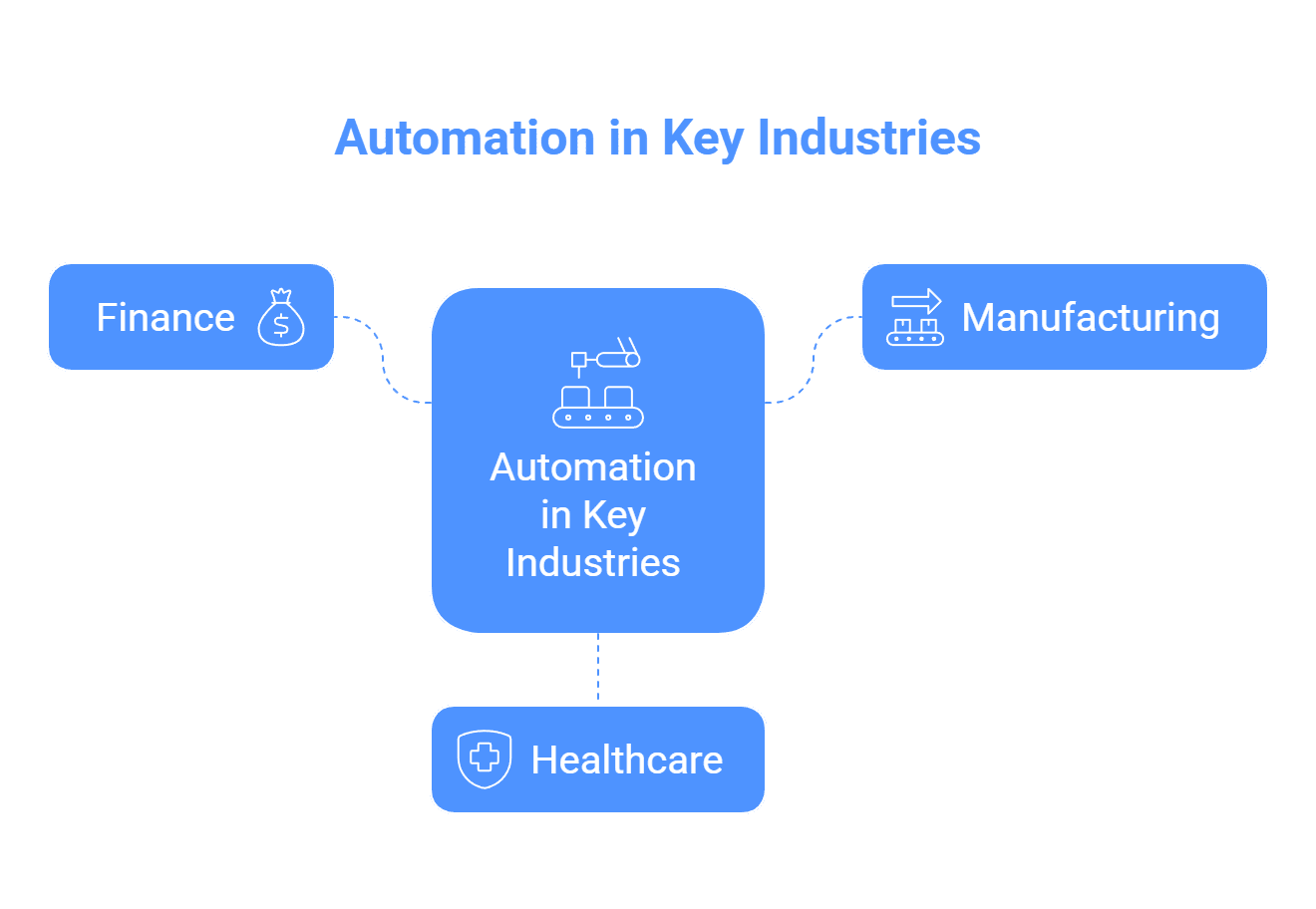
Industry-Specific Automation

  • Finance: Detects fraud by analyzing transactions in real-time.
  • Manufacturing: Predicts equipment maintenance to prevent downtime.
  • Healthcare: Automates patient intake and initial diagnostics.

Major corporations, like those in automotive, use it for intelligent vehicle insights, enhancing operational efficiency.

Key Benefits for Automation

  • Cost Efficiency: Reduces manual work significantly.
  • Flexibility: Adapts to new data and scenarios.
  • Customer Satisfaction: Delivers personalized, 24/7 support.

Azure OpenAI streamlines workflows, minimizing errors and scaling seamlessly.

What Challenges Should You Consider?

Adopting Azure OpenAI requires planning:

  • Data Privacy: Use Azure’s security features to comply with regulations like GDPR.
  • Ethical AI: Leverage content moderation to avoid biases.
  • Implementation Costs: Start with small pilots to manage expenses.
  • Training Needs: Invest in staff training for smooth integration.

Despite these challenges, the productivity gains often outweigh initial costs.

What’s Next for Azure OpenAI?

By 2025, Azure OpenAI will likely expand with:

  • Multimodal AI, combining text, images, and audio.
  • Deeper integration with tools like Copilot and Azure Machine Learning.
  • Autonomous agents that innovate, such as generating new business strategies.

Industries like tax preparation are already adopting it, signaling broader future use.

Why Choose Azure OpenAI?

Azure OpenAI is a game-changer, making data smarter and processes more efficient. It empowers businesses to thrive in an AI-driven world. Ready to start? Explore Microsoft’s resources or try Azure’s free trial to see how it can transform your organization.

NetSuite Module Trends

NetSuite, Oracle’s leading cloud ERP platform, empowers businesses to streamline operations with its modular design. From financial management to supply chain solutions, NetSuite module trends in 2025 focus on AI, automation, and seamless integrations. This article explores the latest updates, their benefits, and future directions for NetSuite users, administrators, and decision-makers. Discover what’s new, how it solves business challenges, and what’s next.

Why NetSuite Module Trends Matter

Businesses rely on NetSuite for flexibility and scalability. The 2025 updates address key needs: real-time insights, reduced manual tasks, and industry-specific solutions. By leveraging AI, automation, and enhanced connectivity, NetSuite helps users save time, improve accuracy, and scale efficiently. Whether you’re in finance, e-commerce, or manufacturing, these trends drive smarter decisions. For tailored implementations, partnering with an IT consulting company can ensure seamless adoption.

Key Trends Shaping NetSuite Modules in 2025

NetSuite’s evolution aligns with ERP demands for efficiency and innovation. Here are the top trends shaping its modules:

  • AI and Machine Learning: AI powers predictive analytics, anomaly detection, and natural language processing. Users can forecast trends and automate tasks without technical expertise.
  • Automation: Streamlined workflows in finance, supply chain, and HR reduce errors and speed up processes.
  • Industry-Specific Features: Tailored tools for healthcare, SaaS, D2C brands, and project-based firms include compliance and dashboards.
  • Third-Party Integrations: New APIs connect NetSuite with Shopify, Salesforce, and Square for seamless data flow.
  • Improved User Experience: Intuitive interfaces, mobile access, and role-based dashboards boost adoption.
  • Compliance and Security: Enhanced audit logs, e-invoicing, and encryption meet global regulations.

These trends answer common questions: How does NetSuite save time? How does it scale? Let’s explore the 2025 releases.

What’s New in NetSuite 2025 Releases

NetSuite delivers two annual releases, bringing automatic updates with minimal disruption. The 2025.1 release focused on usability, while 2025.2 emphasizes AI and efficiency. For businesses needing customized solutions, NetSuite development services can adapt these updates to specific workflows. Here’s what’s new.

NetSuite 2025.1 Updates

This release improved user experience and core functionality.

  • Faster Interface: Cleaner layouts, collapsible menus, and advanced global search. Role-based dashboards show real-time alerts, like cash flow for finance teams.
  • Enhanced Analytics: A search builder lets non-technical users create custom reports. Real-time dashboards cover billing, HR, and inventory.
  • Platform Upgrades: Faster REST APIs, improved sandbox syncing, and better tracking for custom scripts.

NetSuite 2025.2 Updates

This release builds on 2025.1 with AI-driven tools and operational improvements.

  • AI Advancements: Contextual Insights in Analytics Warehouse auto-compare data. Multivariate forecasting in Planning and Budgeting uses machine learning.
  • Supply Chain Tools: Planning Workbench reschedules orders. SuiteAnalytics integrates planning data for ad-hoc reports.
  • Finance Automation: Bulk bank reconciliations, direct revenue posting, and a SaaS Metrics Dashboard track recurring revenue.
  • Additional Features: Support for three user sessions, unified Customer 360 tabs, and a shift to NetSuite2.com data source by 2026.1.
Feature 2025.1 Focus 2025.2 Focus
UI/UX Faster loading, role-based dashboards Redwood theme, multilingual Text Enhance
AI/Analytics AI forecasting, search builder Contextual Insights, Job Analytics
Finance Bank sync automation Bulk reconciliation, SaaS metrics
Supply Chain Planning filters, bin blocking
Integration E-commerce APIs Square, Avalara e-invoicing connectors

These updates address slow processes and data silos, with instant access post-upgrade.

Deep Dive into Module-Specific Updates

NetSuite’s interconnected modules offer targeted enhancements. Here’s how they benefit users.

Finance Module

Finance updates speed up closes and ensure accuracy.

  • AI Forecasting: Predicts cash flows, revenues, and expenses with anomaly detection.
  • Bank Reconciliation: Bulk transaction actions and GL controls accelerate month-ends.
  • Revenue Management: Direct workflow posting and field mapping simplify processes.
  • SaaS Metrics: A dashboard tracks churn and lifetime value, linked to SuiteAnalytics.
  • E-Invoicing: US DBNA and Avalara SuiteApp reduce B2B admin costs.

Tip: SaaS users can enable the Metrics Dashboard for 20-30% faster revenue reporting.

Supply Chain and Inventory Management

New tools enhance visibility and control.

  • MRP Updates: Planning Workbench suggests order changes with subsidiary filters.
  • Warehouse Management: Auto-generated serial numbers and bin blocking with Smart Count.
  • Ship Central: Carrier pickup scheduling and return label generation.
  • Inventory Imports: CSV support for bin putaway data.
  • Analytics: SuiteAnalytics forecasts supply and demand.

D2C brands benefit from faster fulfillment and fewer stockouts. Pair with AI for predictive inventory.

Manufacturing Module

Targeted updates improve precision.

  • Lot/Serial Tracking: Mobile apps enable real-time visibility.
  • WIP Costing: Dashboards for capacity planning and production.
  • Auto Numbering: Built into WMS for seamless builds.

These support scalable manufacturing without custom code. A custom software development service can further tailor these features to complex production needs.

HR and SuitePeople Module

Mobile and AI features streamline talent management.

  • Self-Service Portal: Mobile access for time-off, pay stubs, and updates.
  • Talent Tools: Workflows for reviews and promotions.
  • Compliance: Supports 457(b) contributions and Secure Act 2.0 reporting.
  • Text Enhance: AI generates job descriptions.

These cut HR admin by up to 40%, ideal for remote teams.


NetSuite development company

Analytics and AI Modules

AI drives smarter insights.

  • Analytics Warehouse: Auto-generates data comparisons.
  • Planning and Budgeting: Machine learning for multivariate forecasts.
  • Close Management: Job Analytics summarizes logs.
  • Compliance 360: AI audit summaries and recommendations.
  • NetSuite Expert: Natural language search in SuiteAnswers.

Pro Tip: Customize Text Enhance for 22 languages to support global teams.

Ecommerce and SuiteCommerce Module

Connectivity powers online sales.

  • Faster Checkouts: Abandoned cart emails and headless commerce APIs.
  • Integrations: Sync with Instagram/TikTok Shops, Shopify B2B, and Salesforce.
  • Square Connector: Auto-syncs POS data.

These simplify omnichannel e-commerce.

What’s Next for NetSuite Modules

NetSuite’s roadmap includes deeper AI, sustainability tracking, and industry solutions. The SuiteWorld conference (October 2025, Las Vegas) may preview 2026 features like GenAI for manufacturing and enhanced EPM for budgeting. Expect more automation, quantum-resistant security, and IoT integrations for inventory.

Action Step: Review release notes and test updates in sandboxes. Upgrading to 2025 can yield 15-25% efficiency gains.

Conclusion:

NetSuite’s 2025 module trends make it a top choice for agile businesses. AI insights, automated workflows, and robust integrations address user needs for speed, accuracy, and scalability. Explore these updates in your account or consult a NetSuite partner. Ready to upgrade? Stay ahead with NetSuite’s smarter ERP solutions.

Framer vs Webflow

Startups need a website builder that scales with growth while being easy to use and cost-effective. Framer and Webflow are top no-code platforms, but which one scales better for startups? This article compares their scalability in technical performance, team collaboration, cost, features, and SEO, providing clear, actionable insights for founders.

What Does Scalability Mean for Startups?

What is scalability for a startup website?

Scalability for startups means a platform can handle:

  • Technical Scalability: Adding pages, CMS items, or integrations without slowdowns.
  • Team Scalability: Supporting collaboration and onboarding non-technical team members.
  • Cost Scalability: Affordable pricing with flexible upgrades.
  • Feature Scalability: Growing from an MVP to a complex site with e-commerce or analytics.
  • Performance Scalability: Maintaining fast load times and SEO under high traffic.

In 2025, Framer focuses on simplicity and speed, while Webflow emphasizes customization and depth. Let’s compare their scalability.

What is Framer?

What is Framer, and why do startups use it?

Framer is a no-code website builder with a design-first, Figma-like interface. It’s popular for startups needing fast, visually appealing MVPs. Key features include:

  • AI-powered site generation for quick prototyping.
  • Real-time collaboration for small teams.
  • Over 100 plugins for added functionality.

Startups in regions like California or New York often seek Framer Development Services in USA to leverage its design-focused tools for rapid prototyping. However, its CMS supports only 30 collections, which may limit content-heavy sites.

What is Webflow?

What is Webflow, and why is it popular for startups?

Webflow, launched in 2013, is a no-code platform for building responsive, code-exportable websites with advanced CMS and e-commerce. It’s favored for complex sites. Key features include:

  • Multi-reference CMS fields for robust content.
  • E-commerce plans starting at $29 per month.
  • Over 240 apps for integrations.

For startups needing custom solutions, Webflow Development Services provide robust support for building complex, scalable sites. However, its steeper learning curve can challenge early-stage teams without design expertise.

How Do Framer and Webflow Compare for Scalability?

Which platform scales better for startups?

Below, we compare Framer and Webflow across key scalability factors based on 2025 data.

1. Ease of Use

Which is easier for startups to learn?

Framer’s intuitive interface and AI tools enable non-technical founders to build sites in days. Webflow’s class-based system requires more time to master, though guided tutorials help.

Winner: Framer for quick onboarding and faster MVP launches.

2. Customization and Features

Which platform offers better customization for growing startups?

Framer excels in animations and visual storytelling, with AI styles and a growing plugin marketplace. It lacks native e-commerce and advanced CMS relationships. Webflow offers 16 CMS field types, JavaScript minification, and extensive apps for complex designs and backend logic.

Winner: Webflow for startups needing advanced features like e-commerce or SaaS dashboards.

3. Technical Scalability

How do Framer and Webflow handle technical growth?

Feature Framer (Scale Plan) Webflow (Business Plan)
Pages Limit 30,000 300 (custom on Enterprise)
CMS Items/Collections 30 collections (custom on Enterprise) Up to 20,000 items, 40 collections
Bandwidth/Traffic 500 GB Surge protection included
Team Editors 10 ($40 per additional) 10 legacy editors
Locales 20 ($40 per additional) Custom on higher plans

Webflow supports larger CMS volumes and high traffic with its premium CDN. Framer’s Enterprise options offer flexibility but may not match Webflow’s capacity.

Winner: Webflow for content-heavy or high-traffic sites.

4. Cost Scalability

Which platform is more cost-effective as startups grow?

Framer offers a free plan, Launch at $75 per month (15,000 pages), and Scale at $200 per month. It’s affordable for solo founders, but editor add-ons increase costs. Webflow’s plans include a free Starter, Basic at $14 per month, and Business at $39 per month. E-commerce plans range from $29 to $212 per month. Startups can hire Webflow developers to manage costs effectively during scaling.

Winner: Framer for bootstrapped startups, Webflow for scaling businesses.

5. Performance and SEO

Which platform is better for SEO and performance?

Framer supports responsive designs and basic SEO (meta tags, sitemaps) with AI-optimized speed. Webflow offers advanced schema markup, cleaner code, and integrated analytics, scoring 5 to 10 points higher on Google Lighthouse.

Winner: Webflow for startups relying on organic traffic and performance.

6. Integrations and Support

Which platform has better integrations and community support?

Framer provides over 100 plugins and a designer-focused community on Slack and Discord. Webflow offers over 240 apps and extensive resources like Webflow Academy, forums, and YouTube tutorials, supporting complex scaling challenges.

Winner: Webflow for long-term ecosystem support.


webflow development services usa

What Are the Pros and Cons of Each Platform?

Platform Pros Cons
Framer Fast prototyping with AI
Affordable for small teams
Designer-friendly
Limited CMS
No native e-commerce
May need migration for complexity
Webflow Robust CMS and e-commerce
Strong SEO and performance
Extensive integrations
Steeper learning curve
Higher team costs
Less agile for quick edits

When Should Startups Choose Framer or Webflow?

Which platform is best for my startup’s stage?

Choose Framer:

  • Early-stage startups needing quick MVPs or portfolios.
  • Sites under 10,000 pages with a focus on visuals.
  • Teams with limited budgets or design-heavy skills.

Choose Webflow:

  • Startups planning content growth, e-commerce, or high traffic.
  • Businesses needing advanced SEO or complex CMS.
  • Teams with design experience aiming for enterprise-level growth.

A hybrid approach (Framer for MVP, Webflow for scaling) may cost $5,000 to $10,000 for redesign.

Conclusion

Which platform scales better for startups in 2025?

Webflow is the better choice for long-term scalability due to its robust CMS, superior SEO, and high-traffic performance. It’s ideal for startups growing into content-rich or e-commerce sites. Framer excels for early-stage startups needing fast, affordable MVPs with strong visuals. Choose Framer for speed and simplicity, Webflow for depth and growth. Monitor platform updates to align with your startup’s evolving needs.

FAQs: Framer vs Webflow for Startups

1. Can Framer handle e-commerce for growing startups?

Answer: Framer lacks native e-commerce functionality, making it less suitable for startups planning online stores. You can integrate third-party tools like Shopify via plugins, but this may require Framer Development Services in USA for custom setups. For native e-commerce, Webflow is a better choice with built-in features starting at $29 per month.

2. Is Webflow’s learning curve too steep for small startup teams?

Answer: Webflow has a steeper learning curve due to its class-based system, which can challenge small teams without design experience. However, startups can hire Webflow developers to streamline the process, reducing onboarding time and enabling faster scaling for complex sites.

3. How do Framer and Webflow compare for SEO scalability?

Answer: Webflow offers superior SEO scalability with advanced schema markup, cleaner code, and integrated analytics, scoring higher on Google Lighthouse. Framer supports basic SEO but is less robust for organic traffic growth. Webflow Development Services can further optimize SEO for startups aiming for high search rankings.

4. Which platform is more cost-effective for a bootstrapped startup?

Answer: Framer is more cost-effective for bootstrapped startups, with a free plan and Launch at $75 per month for 15,000 pages. Webflow’s plans start at $14 per month but can escalate with e-commerce or team add-ons. Framer’s affordability suits early MVPs, while Webflow supports long-term growth.

5. Can both platforms support team collaboration as startups grow?

Answer: Both Framer and Webflow support team collaboration, with Framer offering real-time editing for up to 10 editors and Webflow providing similar access. Webflow’s larger community and resources make it better for scaling teams, while Framer’s intuitive interface suits smaller, design-focused teams.